How I Discovered Independent Entrepreneurs Are Working 25% Fewer Hours While Tripling Their Client Base!
And why you need to pay attention before it’s too late.
As someone who had early beta access to ChatGPT, I could definitely see how these claims might be true.
Still, being a data-driven person, I wanted to make sure I could actually back them up with real numbers before drawing any conclusions.
What I found completely changed how I think about artificial intelligence and how small businesses operate in today’s world of business.
After spending years testing AI tools myself and talking to dozens of successful solopreneurs, I can tell you this isn’t hype.
It’s happening right now, and the numbers are pretty remarkable.
Here’s what I found successful solopreneurs are actually doing:
-
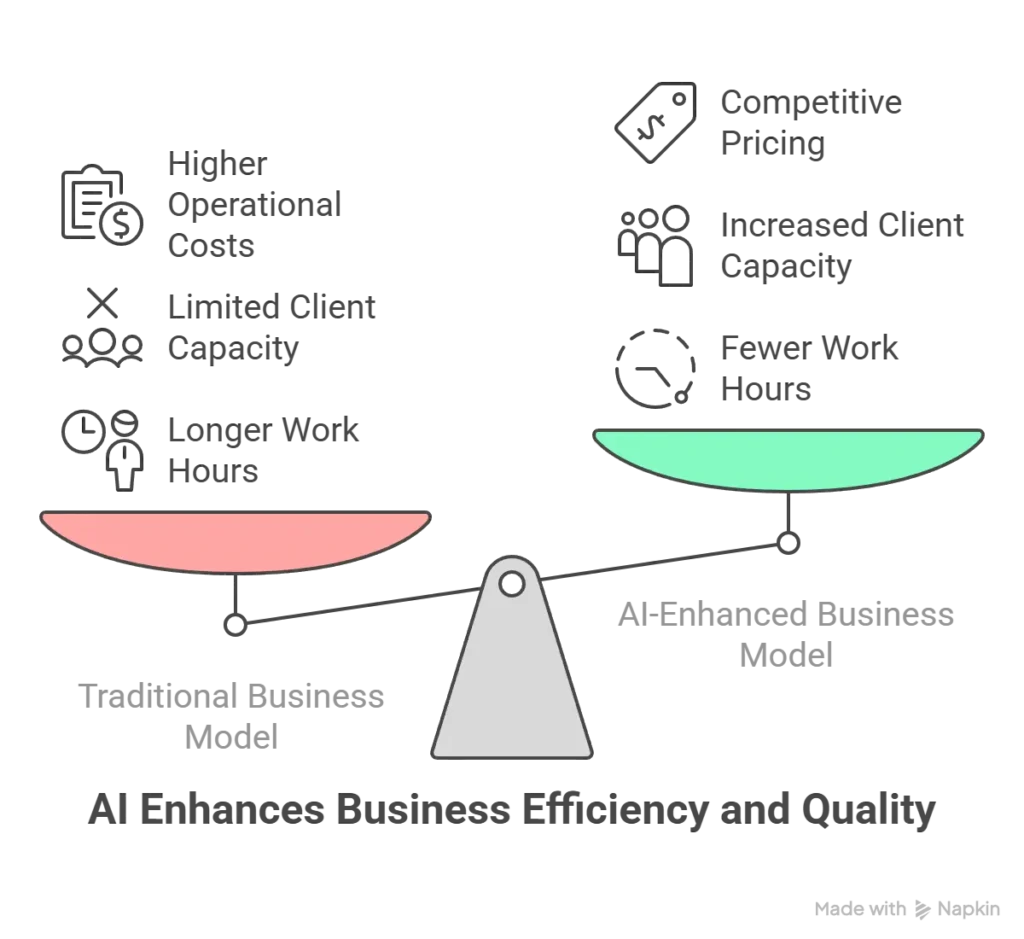
- Working 15-25% fewer hours while maintaining the same income and achieving better work-life balance
- Scaling to 2-3x more clients without hiring full-time employees or team members
- Offering more competitive pricing due to dramatically reduced operational costs and startup costs
- Delivering higher quality work with AI-enhanced outputs that often surpass what traditional entrepreneurs produce manually
- Responding faster to potential clients with fully automated workflows and improved time management systems
Sound impossible? That’s exactly what I thought.
But after leveraging my background in technology and business to systematically analyze 70+ different solopreneur categories and conducting detailed interviews with dozens of independent professionals, I can tell you this isn’t marketing fluff — it’s a documented trend that’s accelerating faster than most people realize.
This rise of the solopreneur represents one of the most significant shifts in how small business owners approach their own businesses, and the good news is that you don’t need years of experience or the help of a partner to capitalize on this transformation.
So how difficult is it? It’s as easy as being able to have a conversation with ChatGPT or any other Large Language Model (LLM).
Let me tell you about Sarah, a small business owner I interviewed last month.
She’s a freelance content writer who used to work 60-hour weeks just to keep up with five clients.
As her own boss, she was trapped in the typical solopreneur business model of trading time for money.
Today? She serves 15 clients, works 45 hours per week, and earns 280% more income while maintaining genuine connections with each client.
How?
She figured out something that most solo entrepreneurs are still missing:
AI doesn’t replace the successful solopreneur — it supercharges them.
This represents a major difference from traditional business approaches and offers new opportunities for financial independence.
And here’s the part that should get your attention if you’re running any kind of independent business: this opportunity window won’t stay open forever.
The best time to act is now, before this becomes standard practice in every marketing agency and business plan template.
The Hidden Problem That’s Killing Solo Entrepreneurs (And Why I Almost Missed It)
Nobody talks about the brutal math behind most solopreneur businesses when they’re busy glorifying the “be your own boss” lifestyle.
But I’ve been into technology and productivity tools long enough to spot the fundamental problem that makes most solopreneur businesses unsustainable without the right tools and an effective way of managing repetitive tasks.
Here’s the reality: 73% of sole proprietors burn out before they ever break through.
Why? Because they’re trapped in what I call the “time-for-money prison” — one of the common pitfalls that distinguishes the struggling solopreneur business owner from those who achieve long-term success.
Think about the math.
As someone running your own business, you have exactly 168 hours per week. Sleep takes 56.
Basic personal life maintenance takes another 30-40.
That leaves you with maybe 80 work hours for your business.
But here’s where it gets ugly, and why so many small business owners struggle:
40-60% of those hours disappear into non-billable administrative quicksand.
I learned this the hard way when I started tracking my own time as a consultant (yes, even consultants have side projects).
Want to know where those hours actually go?
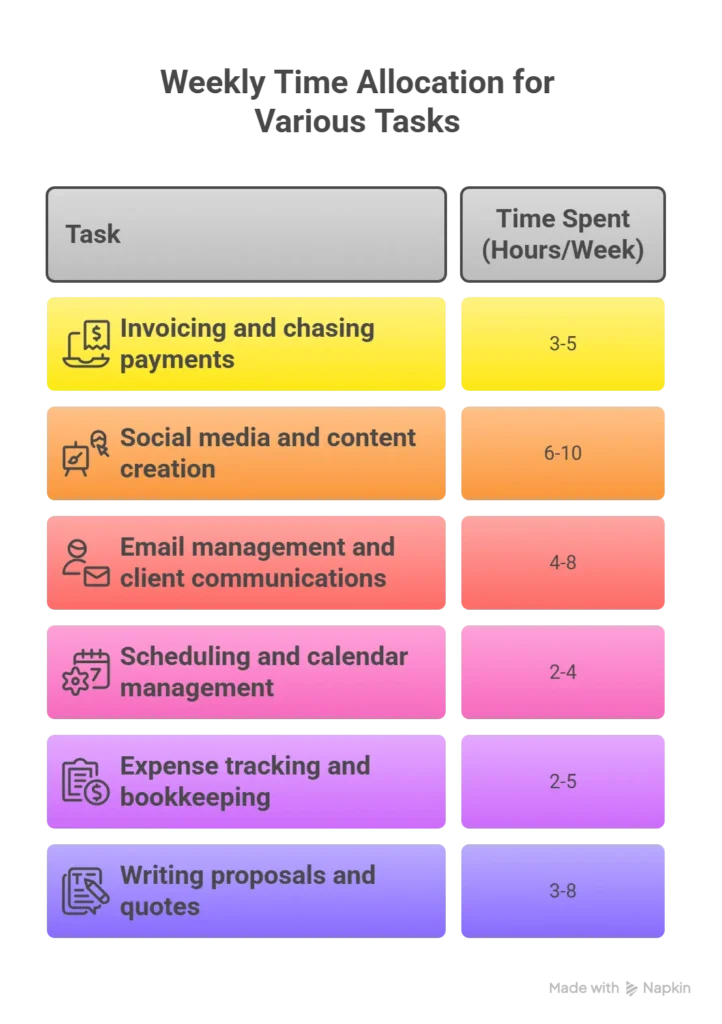
Let me break it down—these are the key differences between successful solopreneurs and those who struggle with time management:
-
- Invoicing and chasing payments: 3-5 hours/week (financial management nightmares)
- Social media and content creation: 6-10 hours/week (building brand awareness and online presence)
- Email management and client communications: 4-8 hours/week (maintaining personal connections)
- Scheduling and calendar management: 2-4 hours/week (coordinating client meetings)
- Expense tracking and bookkeeping: 2-5 hours/week (protecting personal assets and financial goals)
- Writing proposals and quotes: 3-8 hours/week (competing for new business opportunities)
Add it up, and you’re looking at 20-40 hours per week of administrative work that doesn’t directly generate revenue.
No wonder most solopreneur business owners hit a wall at 40-50 billable hours!
This is where the distinct differences between those who achieve work-life balance and those who don’t become crystal clear.
But here’s what really caught my attention when I started researching this: these same five pain points show up in virtually every solopreneur category I analyzed.
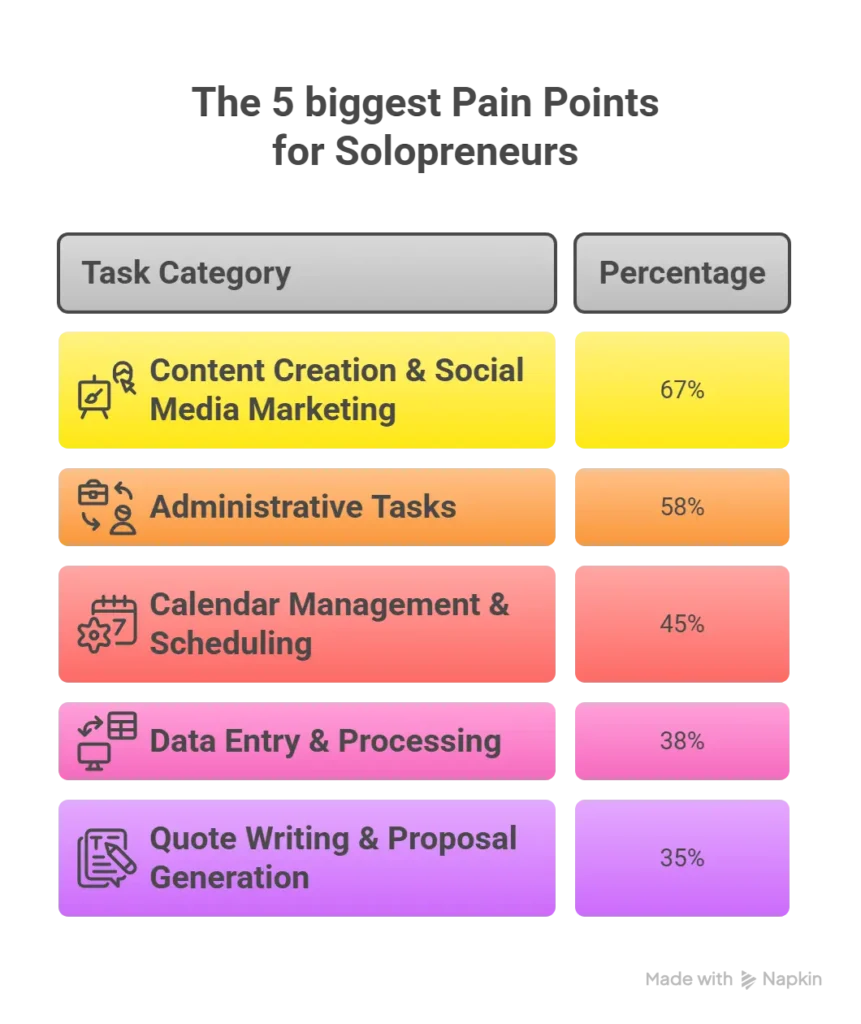
Whether you’re running web development services, operating a restaurant business, creating online courses, developing mobile apps, or pursuing any other business idea as a solo entrepreneur, you’re drowning in the same administrative tasks.
The specific tools might be different, but the time drain is universal across all types of small businesses.
And that’s exactly why AI tools represent such a massive opportunity for the solopreneur journey.
The Data That Made Me Take This Seriously
I’m going to share some numbers that honestly shocked me when I first calculated them during my research into how modern business owners are adapting to new technology.
After analyzing 70+ solopreneur categories — from transcriptionists to wedding planners to commodity traders — I found that AI tools can save independent professionals anywhere from 3 to 35 hours per week!
This represents practical tips that could be the best way to achieve financial independence while maintaining greater control over your personal life.
Yes, you read that right. Thirty-five hours per week!!!
Let me show you the categories where AI is having the biggest impact on how business owners operate:
The Heavy Hitters (20+ hours/week savings):
-
- Transcriptionists: 25-35 hours saved (AI can handle 80-90% of manual transcription work—no physical location required)
- Bookkeepers: 20-30 hours saved (automated data entry and financial management processing)
- Videographers: 20-25 hours saved (AI video editing and post-production, perfect for creative works)
When I first saw these numbers, I thought there had to be some mistake.
So I reached out to Marcus, a freelance videographer in Austin who’s been building his strong personal brand over years of experience.
“Dude,” he told me during our video call, “I used to spend 60 hours a week editing videos.
Now I spend maybe 35-40.
The AI handles all the basic cuts, color correction, and even generates rough drafts. I just polish and add the creative touches that maintain my brand identity.”
Marcus went from 4 clients to 9 potential clients without working more hours.
His income jumped from $80K to $165K annually—a testament to long-term growth achieved through smart business decisions rather than just grinding harder.
But it’s not just the heavy hitters.
Even “lower impact” categories are seeing significant gains that represent new opportunities for small business owners:
High Impact Categories (15-20 hours/week):
-
- Virtual Assistants (hired on an as-needed basis by other business owners)
- Social Media Managers (building online presence for a group of people)
- SaaS Founders (developing and maintaining mobile apps)
- Affiliate Marketers (creating passive income streams through side projects)
Medium Impact Categories (8-15 hours/week):
-
- Writers (like me! Creating content and online courses)
- Designers (working on creative works and brand identity projects)
- Consultants (offering expertise without the risks of a business requiring full-time employees)
- E-commerce operators (managing their side hustle or full-time venture)
I’ll give you a personal example from my own solopreneur journey.
Last year, I was spending about 12 hours per week on content research, social media posting, and client email management.
Now? Maybe 4 hours — and that’s the major difference that AI tools have made.
Perplexity AI handles my initial research. Buffer with AI scheduling manages my social media. Smart email templates handle 80% of my client communications.
That’s 8 hours per week I got back.
At my consulting rate, that’s worth about $4,000 per month in additional capacity.
The AI tools cost me maybe $200/month total — making this an effective way to dramatically improve my work-life balance.
The ROI is pretty straightforward: $4,000 saved ÷ $200 spent = 2,000% return on investment.
But here’s what really gets me excited about this transformation in how solo entrepreneurs operate…
The Great Solopreneur Split (And Why You Need to Pick a Side)
I’m watching the independent business world split into two distinct groups, and honestly, it’s starting to look like two completely different industries.
This shift represents key differences that will determine long-term success in the world of business.
Group 1: The AI-Adopters
These successful solopreneurs figured it out early.
They’re working smarter, scaling faster, and building sustainable businesses without needing the help of a partner or full-time employees.
When I talk to them, they sound… relaxed. Confident.
Like they’ve found some kind of productivity cheat code that gives them greater control over both their business and personal life.
Group 2: The Resisters
Still grinding 60+ hour weeks like traditional entrepreneurs.
Still losing potential clients to “cheaper” competitors (who are actually AI-enabled).
Still burning out on repetitive tasks that could be automated.
These small business owners are missing new opportunities while stuck in outdated business models.
Let me show you what I’m seeing in the market right now, and why this represents such a critical business decision for every solo entrepreneur.
AI-adopting content writers are offering 40-50% lower rates than traditional writers while delivering faster turnaround times.
Why? Because their actual cost per piece is 70% lower thanks to AI assistance — they can focus on building genuine connections with clients rather than getting bogged down in repetitive tasks.
AI-powered consultants are responding to RFPs in hours instead of days. They’re using AI to generate initial proposals, research client industries, and create presentation drafts — all while maintaining their strong personal brand and years of experience as key differentiators.
Smart e-commerce solopreneurs are using AI for product research, customer service, and inventory forecasting.
They’re managing 3x more SKUs with the same effort, turning their side hustle into a full-time business without the typical startup costs and risks of a business requiring a physical location.
And the traditional small business owners?
They’re getting left behind, wondering why clients are choosing “inferior” competitors, not realizing that the best way forward involves embracing new things rather than resisting technological change.
Here’s the reality: It’s not about inferior vs. superior anymore.
It’s about AI-enhanced vs. manual labor.
This distinction will determine which business owners achieve financial independence and which ones get stuck in common pitfalls.
The question is: which side do you want to be on in your solopreneur journey?
What Actually Works (The Right Tools I Wish I’d Found Sooner)
Okay, let’s get practical.
After testing dozens of AI tools myself and interviewing successful solopreneurs across every category I could find, here are the “Big 5” tool categories that actually move the needle for small business owners:
1. Content Creation & Social Media
My current setup: Perplexity AI Pro for writing and research, Claude for complex analysis, Canva AI for quick graphics, Buffer to post it all on social media — the best way to maintain consistent online presence.
Time saved: 8-10 hours per week on content creation and social media management.
Real talk: I was skeptical about AI writing at first. “It doesn’t sound like me!” I complained.
But then I realized I wasn’t asking it to write for me — I was asking it to help me write faster while maintaining my brand identity.
Big difference for any solopreneur business owner.
Now I use AI to:
-
- Generate research summaries and data points for online courses
- Create first drafts that I heavily edit and personalize
- Brainstorm headlines and angles I wouldn’t have thought of
- Optimize content for different platforms and build brand awareness
The result? I publish 3x more content in half the time, and honestly, it’s better than what I was producing before.
This represents an effective way to scale creative works without hiring team members.
2. Administrative Automation
Tools that changed my personal life: QuickBooks AI for expense tracking, Calendly for scheduling client meetings, automated invoice systems for financial management.
Time saved: 5-7 hours per week on admin tasks.
Look, nobody becomes a solo entrepreneur because they love doing invoices. But we all spend way too much time on this stuff.
AI-powered admin tools don’t just save time — they eliminate the mental overhead of remembering to do these repetitive tasks, giving you greater control over your work hours.
3. Customer Communication
Game-changers: AI email drafting, chatbots for initial client inquiries, automated follow-up sequences that maintain personal connections.
Time saved: 4-6 hours per week on email and client communications.
I used to spend Sunday evenings crafting the “perfect” client emails.
Now I have AI generate a first draft based on the context, I personalize it, and I’m done.
Response rates actually improved because the AI helps me structure emails more clearly — practical tips that work in the real world of business.
4. Data Processing & Analysis
Category dependent, but powerful: Industry-specific AI tools, spreadsheet automation, report generation for better business decisions.
Time saved: Varies wildly by category (5-20 hours/week for data-heavy roles).
If you’re in bookkeeping, market research, web development, or any data-heavy field, this is where AI absolutely shines.
I’ve seen bookkeepers cut their data entry time by 80% — a major difference that allows them to serve more clients on an as-needed basis.
5. Research & Competitive Intelligence
My secret weapons: AI-powered research tools, automated competitor monitoring, trend analysis for identifying new opportunities.
Time saved: 3-5 hours per week on research and market analysis.
This one’s huge for consultants and anyone who needs to stay on top of industry trends.
AI can monitor hundreds of sources and deliver personalized briefings.
It’s like having a research assistant who never sleeps — perfect for the solo entrepreneur who needs valuable insights but can’t afford full-time employees.
Think of it this way: Justin Welsh, one of the most successful solopreneurs online, has talked extensively about how the right tools and systems are what separate successful solo entrepreneurs from those who struggle.
AI tools are simply the next evolution of this principle.
The 90-Day Implementation Plan (What Actually Works)
Here’s what I learned about implementing AI tools: start with your biggest pain point, not the shiniest tool.
This is one of the most practical tips I can offer based on years of experience helping people optimize their workflows.
I made the mistake of trying to automate everything at once. Total disaster!
Analysis paralysis, tool overwhelm, and ultimately giving up for months.
This is one of the common pitfalls that can derail your solopreneur journey before it really begins.
The approach that actually works for achieving long-term success:
Month 1: Pick your AI-Tool
Find & pick ONE tool that addresses your biggest time drain:
-
- For most business owners, this is content creation or admin tasks
- Set a goal to master this tool completely
- Track your time savings obsessively—this data will inform future business decisions
Month 2: Add one more AI-Tool
Add ONE more tool for your second-biggest pain point:
-
- Don’t add new things until you’ve mastered the first tool
- Look for tools that integrate with what you’re already using
- Focus on building systems that support your financial goals
Month 3: Optimize
Optimize and integrate:
-
- Connect your tools to create automated workflows
- Fine-tune prompts and settings for maximum efficiency
- Add advanced features or additional tools on an as-needed basis
Pro tip: Start with free trials, but don’t cheap out if a tool saves you significant time. I spent months trying to make free tools work when a $50/month solution would have saved me 10 hours per week. The math doesn’t make sense for any serious small business owner focused on long-term growth.
This approach represents the best way to avoid the risks of a business model that depends entirely on your personal time and energy — one of the key differences between solopreneurs who burn out and those who build sustainable enterprises.
Your Choice Defines Your Future (And I’m Not Being Dramatic)
Look, I’ve been working in technology and business productivity for over a decade.
I’ve seen a lot of “revolutionary” trends come and go in the world of business.
This isn’t one of those trends.
We’re living through the most significant productivity revolution since the personal computer, except it’s happening in months, not years.
This transformation affects everyone from sole proprietors running side projects to established business owners with years of experience.
Every week I interview solopreneurs, I hear the same story: “I wish I’d started using AI tools six months ago.”
Whether they’re running online courses, managing web development projects, or operating any other type of small business, the sentiment is universal.
You know what I never hear? “I regret adopting AI tools too early.”
The choice facing every solo entrepreneur today is straightforward but significant, and it will determine whether you achieve the work-life balance and financial independence you’re seeking:
Option 1: Status Quo – The Hard Way
Keep doing things the hard way while watching AI-enabled competitors pull ahead, missing new opportunities while stuck with traditional approaches that limit your potential clients and income.
Option 2: The Smart Way
Embrace AI tools and join the revolution of solopreneurs working smarter, not harder — achieving greater control over your personal life while building long-term success.
The window is closing.
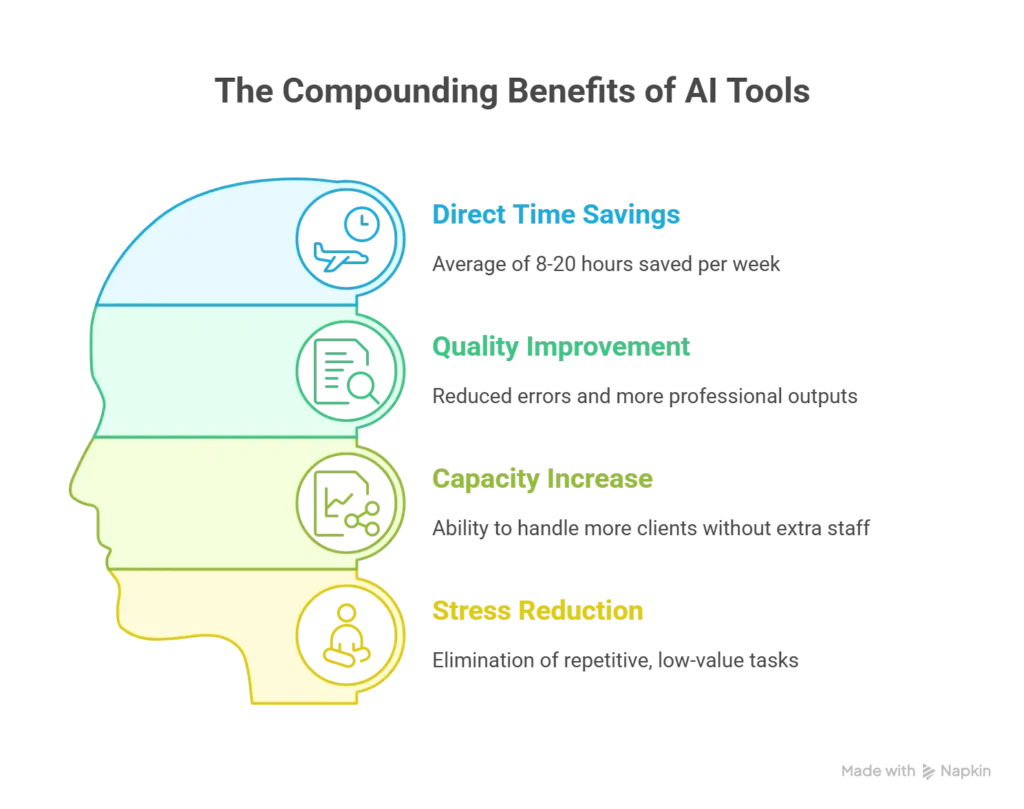
Early adopters already have 6-12 month head starts.
 They’ve figured out the right tools, refined their workflows, and built sustainable competitive advantages.
They’re the ones achieving genuine connections with more clients while working fewer hours—the holy grail of the solopreneur business model.
Every day you delay is a day your competitors get further ahead.
Every week you spend on repetitive tasks that AI could handle is time you can’t get back — time that could be invested in building your strong personal brand, developing new business opportunities, or simply enjoying better work-life balance.
But here’s what gets me excited about this moment: we’re still early enough that adopting AI tools now puts you in the leading group, not the catching-up group.
The business owners who act in the next 3-6 months will define their industries for the next decade.
They’ll be the ones offering the best way forward for potential clients while maintaining the distinct differences that make their personal brand valuable.
The question isn’t whether AI will transform your business — it’s whether you’ll lead that transformation or get left behind by it.
This is your business decision to make.
The course of your career as a solo entrepreneur depends on how you respond to this opportunity.
The good news is that you don’t need a complex business plan, significant startup costs, or the help of a partner to get started — just the willingness to embrace new things and commit to your solopreneur journey.
So what’s it going to be?
What’s the first AI tool you’re going to test this week to start building your path toward financial independence?
Explore our AI Tools Marketplace and identify the perfect tool candidates for your specific business needs.
Subscribe to my newsletter and get the complete Solopreneur AI Research Report for free – it includes personal tool recommendations, ROI calculators, and valuable insights for 70+ business categories.
Plus, you’ll get weekly insights on the latest AI tools I’m testing and which ones are actually worth your time and money.
Trust me, your future self will thank you for starting today.
This is the best time to make the transition from traditional entrepreneur to AI-powered solo entrepreneur — don’t let this opportunity for long-term growth and genuine work-life balance pass you by.